For iPhone, Android, Apple Watch and the web

Know how many days you can last at home, and what your family does next.

PrepperApp adds up your water and food into one honest number, keeps your family's emergency plan in one place and records your walks — even when the network goes down.

Free to use. Pro is a one-time purchase, no subscription.

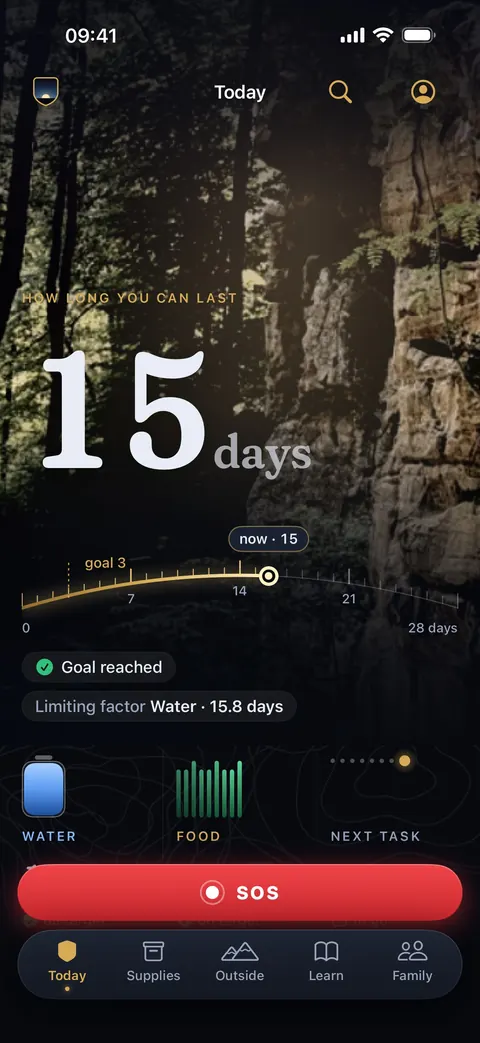
PrepperApp's Today screen: 15 days ahead on the horizon arc, goal reached, and the meters for water, food and the next task
SampleThe Today screen, with sample data
  • Works offline
  • End-to-end encrypted private chat
  • No ads
  • 4 languages · 7 regions
New

PrepperApp 3.9.7 for iPhone and 1.5.8 for Android

Now available in the App Store and Google Play. Already have the app? You'll get the update automatically.

The weather on your own map

Rain radar for almost all of Europe and the US, new every 5 minutes. Coloured wind arrows, worldwide. And river levels in Germany, England, France, the US and Canada. All from open sources, on the same map as your hikes.

Try it on the map

Four moments

What it does for you, at the moment it counts

Tuesday evening. The lights go out.

You know right away how many days you can last.

You scan what you have at home: a barcode, a receipt or a whole shelf. The app works with 3 litres of water and 2,000 kcal per person per day and tells you in days, not as a vague score.

  • The sum is shown, so you can check it yourself
  • You see what runs out first — in this example, water
  • What you haven't entered yet is shown plainly as ‘not measured’
  • Reserve water from your boiler and rain barrel counts too
  • You keep track of your supplies together with your family

15 days ahead. Limiting factor: Water.

How long you can last

07142128 daysgoal 3now · 15
Goal reachedLimiting factor Water · 15.8 days

Water

15.8days

on target

Food

18.4days

on target

Needed per day

12litres

8,000 kcal
People at home
4
190 litres
42 kg
Counted as dry food such as rice and pasta, about 3,500 kcal per kilo

Norm: 3 L and 2,000 kcal per person per day. This is an example calculation; the app works with what you really have at home, product by product.

You're not home. The kids are.

Your family knows what to do, and you know how they are.

Everyone at home is in the same household, with one emergency plan, agreed meeting points and the emergency contacts at hand. With one tap you mark: I'm safe, or I need help. Your family sees it as soon as they open the app.

  • End-to-end encrypted private chat
  • A shared emergency location when someone needs help
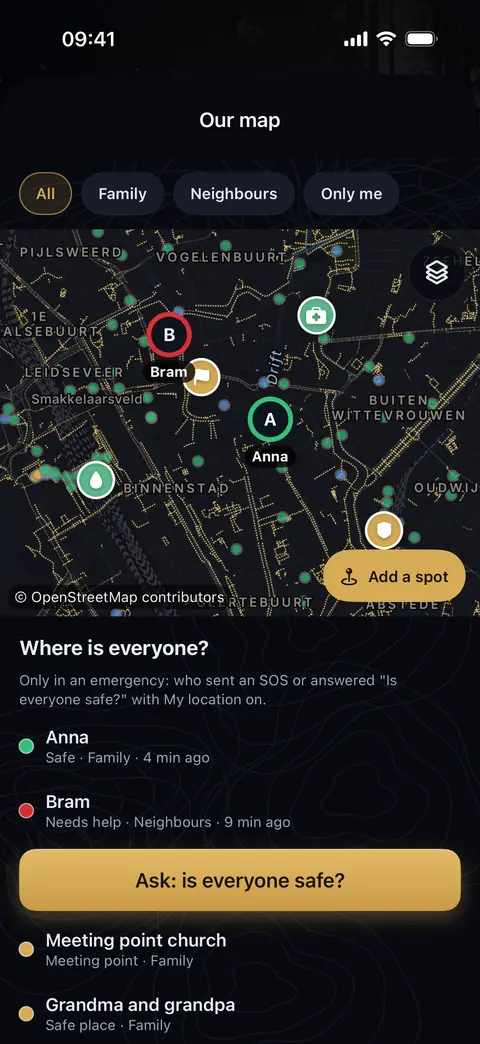
  • Our map: your meeting point and safe places on one map, with ‘Take me there’. Encrypted, also without internet
  • SOS button on every screen, with the emergency number for your region
  • Also for a child without a phone: you fill it in on your device
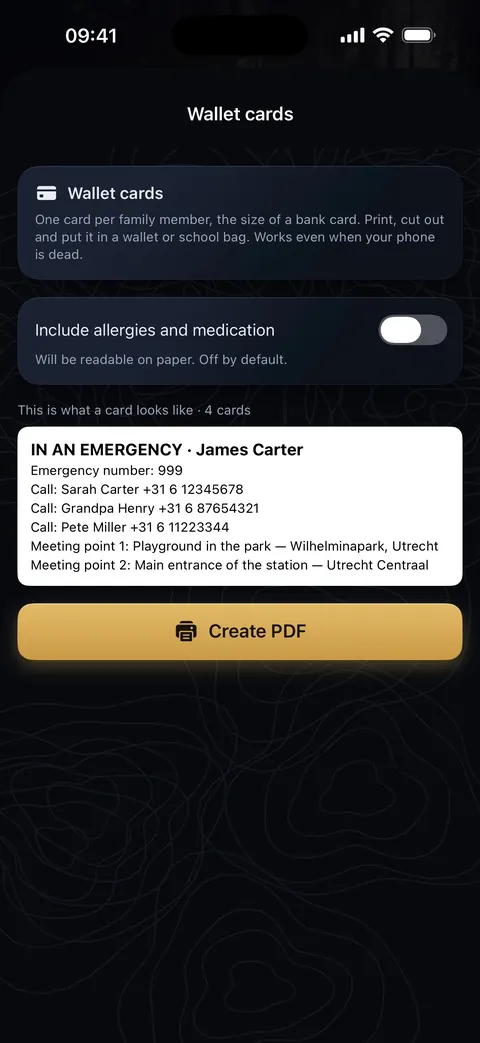
  • A family card and wallet cards to print, for when a phone is dead
The Our map screen: the meeting point, the safe places and two family members on the map, and below it ‘Where is everyone?’ with who is safe and who needs help
Our map
The Wallet cards screen: an example card for your wallet with the emergency number, who to call and the two meeting points, and the ‘Make PDF’ button
Wallet cards to print

Saturday morning. You lace up your boots.

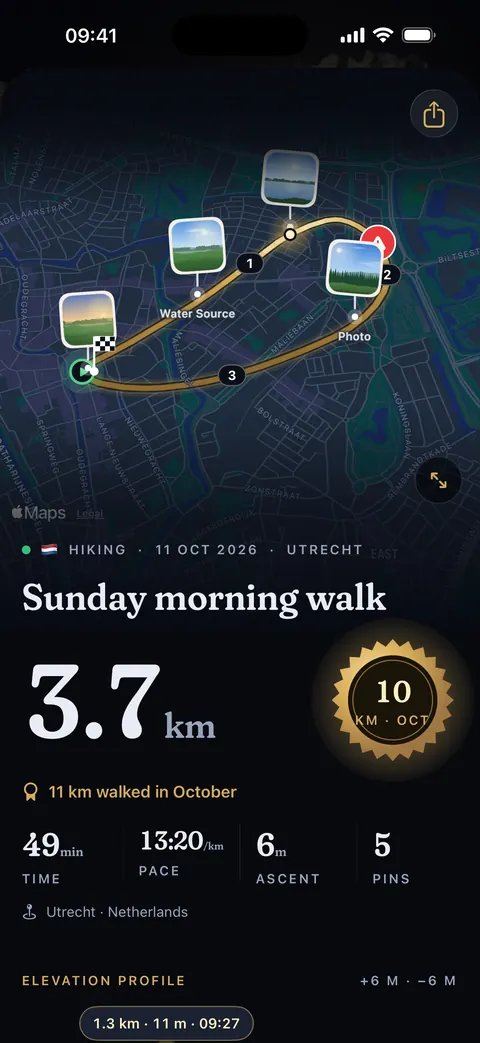
Your walk is recorded, with everything you come across.

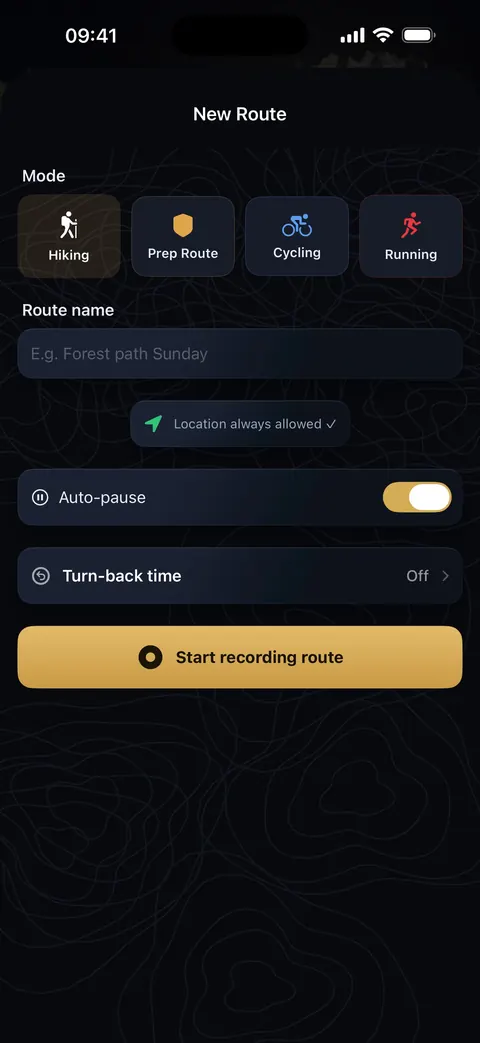
Tap start and the app records your route. Along the way you drop markers — a water source, a viewpoint, a dangerous stretch — and take photos. Before you leave you see the weather and how much daylight is left.

  • Multi-day journeys: your walks day by day on one map
  • A short video of your walk, with map and photos (Pro)
  • Downloaded maps, the compass and your route work without signal too
  • Rain radar, wind and river levels on the map, from open sources
  • Look back at your walks on the website
The New route screen: choose walking, pre-route, cycling or running, turn on auto-pause and a turn-back time, and tap ‘Start recording route’
Starting a route
A recorded walk: the route on the map with photos and markers, and below it the distance, duration, pace and climb
Your walk, with photos

Your phone buzzes. A weather warning for your area.

You get the official warning, not a rumour.

Also from usPrepAlert

A free, standalone app with official warnings from weather services and agencies (such as MeteoAlarm, USGS and GDACS) for where you are and crisis news; with Pro also a daily briefing and your own places. With PrepAlert Pro, serious alerts for your region also appear in PrepperApp — right next to your own supplies and emergency plan.

View PrepAlert
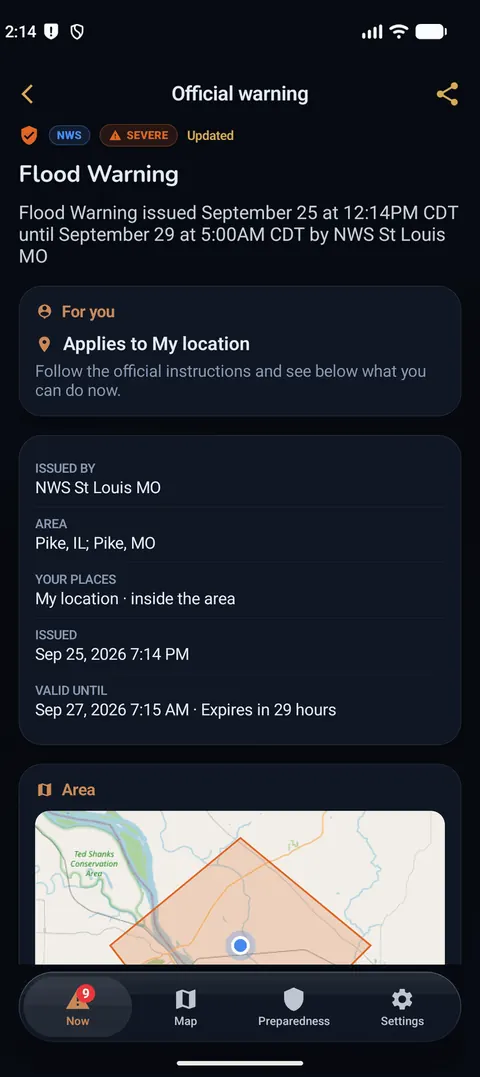
An official warning in PrepAlert: who issued it, for which area and until when it applies
PrepAlert: the official warning
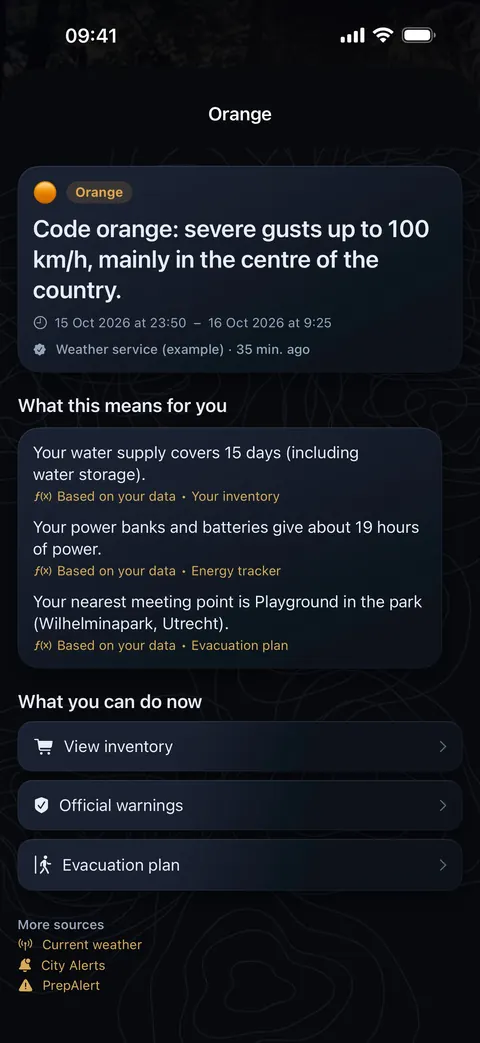
An example warning in PrepperApp: code orange for severe gusts, with the area on the map and below it what it means for you: your water, your power and your meeting point
PrepperApp: what it means for you (example)

SampleReal screens from the new app, with sample data.

What it costs

Free to use. You pay for Pro once.

No subscription, no automatic charges, no ads. You create an account without a credit card.

Free
€0always
An account, the first aid guide, your emergency plan, the barcode scanner and expiry dates. Your supplies up to 10 items, 3 emergency contacts and 1 energy source.
Pro
1×payment
Unlimited supplies, all emergency plan scenarios, the document vault and more. You buy Pro in the iPhone or Android app; after that it applies to your whole account, on the website too.

The amount in your country is shown in the App Store or Google Play, before you buy. Paying from the website isn't possible yet.

Private by design

We ask for an email. Not your data.

An account makes sure your supplies, household and Pro status move safely to a new phone. That's all. Private chats and the family chat are end-to-end encrypted. With your own key, so are your trips, and once everyone in your household has the new app and there is a recovery code, so is what you share — then not even we can read it.

What stays on your phone only

  • Your medical profile, medication, document vault and diary: our server doesn't receive them
  • New phone? You make an encrypted backup yourself, with your own password

To be straight about it: your supplies and emergency plan are stored on our servers in the EU, so your household and your other devices can see them. If encryption is on for your household, they are end-to-end encrypted; otherwise our server can read them.

What we can't or won't do

  • Read your private chats with another account — they're end-to-end encrypted
  • Show ads or sell your data
  • Use your email for anything other than your account

What an account does

  • Phone lost or broken? You can still get in, from a computer too
  • Ownership that holds: no one can secretly make themselves admin
  • Servers in the EU, and everything can be deleted
The five pillars

Everything your household needs, in five tabs

The same layout as in the app: Today, Supplies, Outside, Learn and Family. Pick a pillar to see what's inside.

The Today tab in the app, with sample data

01 · Today

Know where you stand at a glance.

Your home screen works out how long your household can last and tells you the next step — not a vague score, but days.

  • How long you can last — water, food, power and medical
  • What expires this week
  • A coach that suggests your next step
  • Regional alerts for where you live
  • SOS button on every screen
  • 192lessons in the appin 4 languages, available offline
  • 4languagesEN · NL · DE · ES
  • 7regionsNL · BE · DE · ES · UK · US · AU
  • 0adsand no selling of data

When it really counts

Built for the moment the network goes down

PrepperApp is offline-first: your supplies, plans, guides and downloaded maps live on your device and only sync once there's a connection again.

  • The right emergency numberThe SOS button calls the number for your region — 112, 999, 911 or 000.
  • First aid that talks you through itStep by step, read aloud, so your hands stay free.
  • Map and compass without signalOur own map, with rain radar, wind and river levels. Download maps ahead of time; compass, sun position and your route work offline.
  • Messages without a mobile networkOffline chat with nearby phones, or over longer range through a Meshtastic radio.
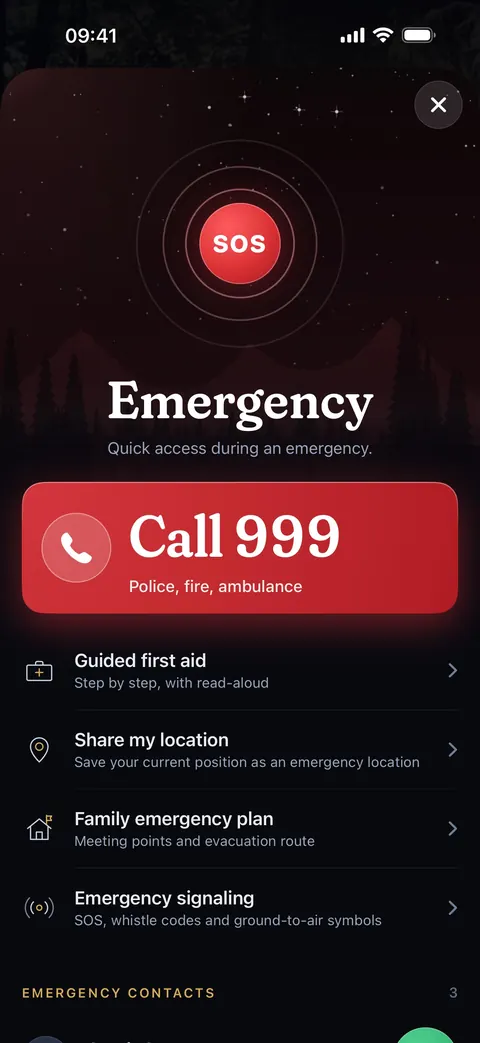
The emergency menu: a large red button to call the emergency number, and below it guided first aid, sharing your location, the family emergency plan and emergency signalling
The emergency menu
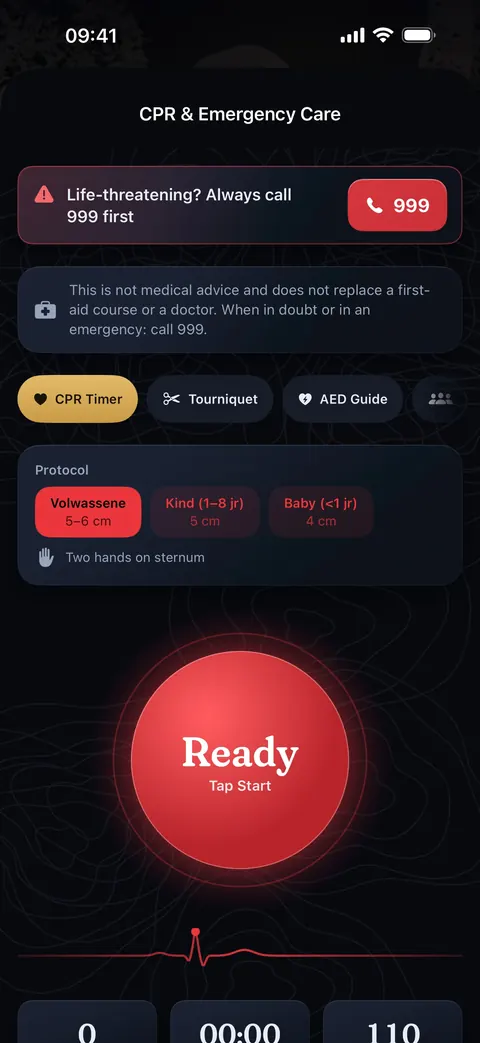
The CPR & Emergency Care screen: at the top ‘always call first’ the emergency number, the choice of adult, child or baby, and a large red button that sets the rhythm of chest compressions
CPR, in rhythm

PrepperApp helps you prepare, but never replaces emergency services. In acute danger, always call your emergency number.

One account, everywhere

On your phone, your wrist and your computer

Whatever you add on your phone shows up on the website right away — and for the rest of your household.

  • iPhone & iPad

    The full app, offline-first, with scanners, maps, first aid and family chat.

    View on the App Store
  • Android

    On Google Play, with the same account as on iPhone and the web.

    View on Google Play
  • Apple Watch

    Days counter, compass, SOS distress signal and route recording — even when your phone isn't nearby. With a complication for your watch face.

  • Widgets

    Readiness, soon-to-expire supplies and trail stats on your home screen — plus Live Activities during a route, CPR or an evacuation.

  • Web dashboard

    The same account in any browser, on a computer, tablet or phone. Handy for long lists and your emergency plan.

    Open in your browser
How it works

Prepared in three calm steps

  1. Create a free account

    In the app on your iPhone or Android, or right here on the website. Pick your region: emergency numbers, sources and advice adapt to it.

  2. Invite your household

    You're the owner and invite family members with a short code. Everyone sees the same supplies and plans.

  3. Build up calmly

    Scan what you have, make your emergency plan and learn what matters. The app shows how many days you can last — and what's still missing.

Community

Prepared together

In the Facebook group Prepared Europe, people from across Europe share practical tips, questions and experiences about being prepared. Free, and you don't need a PrepperApp account.

You'll go to Facebook, where Facebook's privacy rules apply. prepperapp.net itself loads nothing from Facebook.

FAQ

What people ask us

Is PrepperApp free?

Yes — creating an account and using the core Today, Supplies, Outside, Learn and Family features is free. Some advanced features require PrepperApp Pro, a one-time purchase (not a subscription); the exact amount in your country is shown in the App Store or Google Play.

Does PrepperApp work without internet?

The app (iPhone and Android) is offline-first: your supply lists, guides and saved routes stay available without a connection, and sync once you're back online. The website works offline too once you've been logged in: your dashboard opens with your most recently loaded data (view only; changes are possible again once you're online), and the first-aid guides can be read offline as well.

Is there an Android app?

Yes, PrepperApp is available on Google Play. You use the same account as on iPhone and the website.

How do I invite family members?

Whoever creates a household is automatically its owner. Under Family you create a short invite code; your family members enter it after creating their own account. From then on you share supplies, the emergency plan and family card, and talk through the end-to-end encrypted family chat. As owner, you decide who becomes an admin.

All questions and answers

Start today. Calmly, and together.

Free account, no credit card. Pro is a one-time purchase — no subscription. Compare free and Pro

Create a free account